

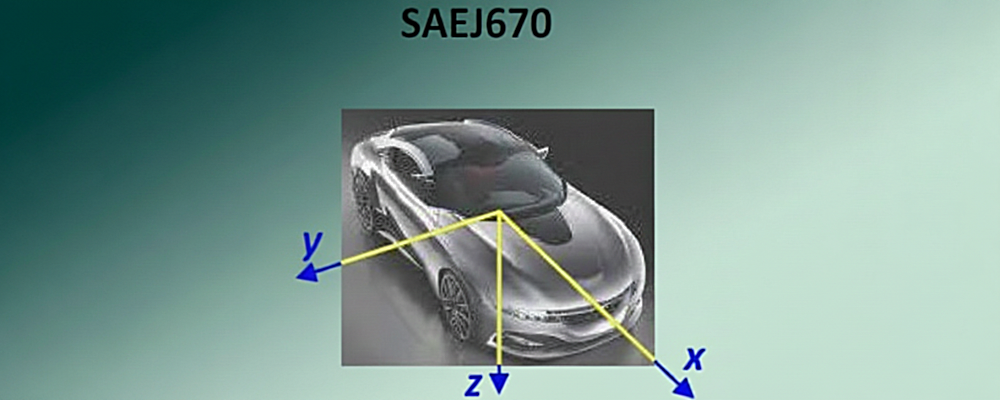
Build Suspension Models Faster with SAE J670e
If your suspension measurements are already recorded using SAE J670e, the calculators let you input those coordinates directly and turn them into a working suspension model.
SAE J670e uses an axis system based on aeronautical practice. In the calculator, the origin is the intersection of the wheel centreline, chassis centre and wheelbase centre. SAE J670e specifies X forward, Y left, and Z down, and only Y and Z are used when entering data into the Calculator.
Why use SAE J670e?
SAE J670e gives you a consistent coordinate format for suspension design. Instead of relying only on drag-and-drop or manual offset measurements, you can enter your measured coordinates in a recognised format and build your model more directly.
The Suspension Calculators are designed to help you design and analyse suspensions. You can also use SAE J670e positioning for related systems, including steering arms, drive shafts, shocks and springs.
How to enter SAE J670e data
- Open the Suspension Geometry Calculator
- Click Edit
- Click Form Input
- Scroll down and click SAE J670e
- Enter your Y and Z coordinates
From coordinates to performance insight
Once your model is created, the calculator can analyse key suspension characteristics, including:
- Roll centre
- Bump steer
- Scrub radius
- Camber gain
- Motion ratio
Each characteristic is rated as bad, okay or good, with an overall score available for the model.
Subscribe to make the most of the analysis and reporting features, create any number of models, save private models and access the calculator’s full feature set.
Read More
Feature Matrix
| Guest | Free | Subscribed | AAA | |
|---|---|---|---|---|
LOGIN or SIGNUP to move to next tier | Subscribe to move to next tier | Thank's for your support. | Thank's for your support. | |
| Input dimensions in SAE J670e format |  | |  | |