

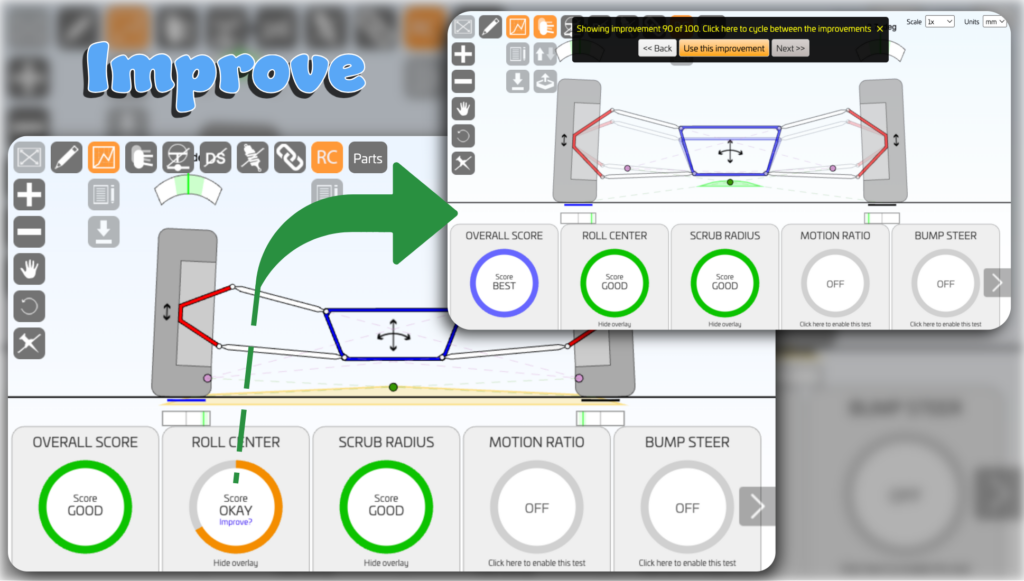
Improve your roll centre in just a few clicks.
Roll centre control is crucial for good handling. If the roll centre moves too much during cornering, the suspension can lose its ability to resist vehicle roll, increasing load on the outside tyres and reducing grip.
As a suspension designer, controlling roll centre movement should be the starting point of the design. It is the foundation from which the other suspension characteristics build.
The calculator analyses roll-centre movement across suspension travel, assigns a red/amber/green score, and suggests geometry changes to improve it.
Suspension travel is determined by the adjustable settings in the roll centre analysis feature, where you define the vehicle’s intended use, such as track, road, or off-road.
Launch it from the ROLL CENTER scorecard by clicking “Improve?”, or use Copilot. Review the overlaid suggestions and click “Use this improvement”.
Instructions
- Launch it from the ROLL CENTER scorecard by clicking “Improve?”.
- The calculator adjusts chassis and upright positions to improve the score.
- Suggested improvements are shown in the existing model.
- Review the suggestions.
- Click “Use this improvement” to apply one.
Limitations
Only available for symmetrical models and when the roll centre score is amber or red.
Resources
Feature Matrix
| Guest | Free | Subscribed | AAA | |
|---|---|---|---|---|
LOGIN or SIGNUP to move to next tier | Subscribe to move to next tier | Thank's for your support. | Thank's for your support. | |
| Automatic roll centre improvements |  | |  | |