

Why Subscribe for the Custom Upright Editor?
Editing an upright can be challenging. When you make one change in the full suspension model, another dimension can also change, which makes it harder to focus on the part you actually want to improve.
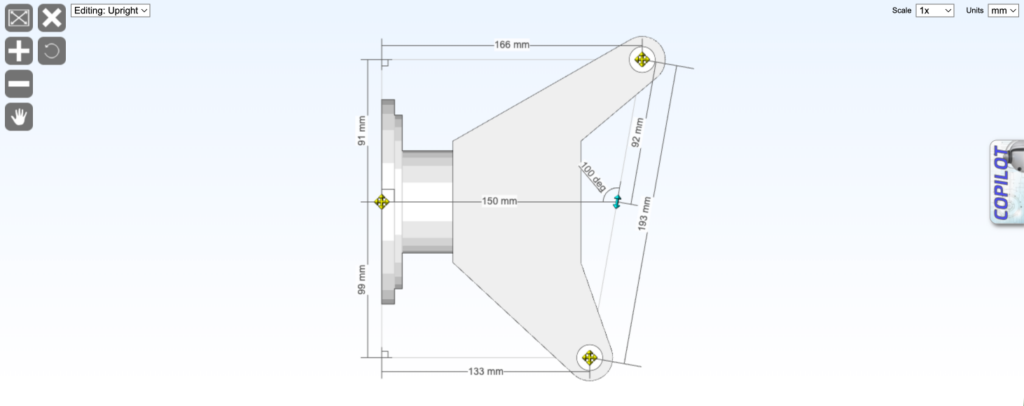
The custom upright editor is designed for convenience. It lets you focus on one part: the upright. Instead of working around the whole suspension model, you get a clearer 2D upright view with more control over the dimensions.
The editor comprises just four nodes you can drag and drop, plus the dimensions you need to compare with the actual dimensions on your vehicle. That makes it the quickest way to design and edit your uprights.
How to use the upright editor
- Open the Suspension Geometry Calculator.
- Click Parts.
- Click the Custom tab at the bottom of the canvas.
- Drag the upright icon onto the upright.
- Use the 2D drag-and-drop editor to resize the upright accurately.
- Click X to return to the main model.
- Use rotate to align the upright with the kingpin angle or hub face angle.
Video
Feature Matrix
| Guest | Free | Subscribed | AAA | |
|---|---|---|---|---|
LOGIN or SIGNUP to move to next tier | Subscribe to move to next tier | Thank's for your support. | Thank's for your support. | |
| Advanced upright editor |  |  | | |

Access All Areas
You are $7.65 away from achieving access all areas. If you spend a total of $7.65 during a billing period you get full access to ALL calculators including as yet unreleased calculators, and no ads, anywhere. Not the expected values? Refresh