
How to lock components
Welcome to this how-to tutorial on the lock feature.
Introduction
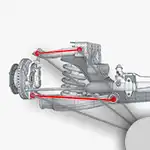
The lock feature enables you to lock components of the suspension while designing, preventing accidental changes. To lock a component, click the parts icon and drag the lock to the desired component.
Once locked, the component is highlighted in orange, and any changes you make will not affect its dimensions or size.
If you attempt to edit the vehicle dimensions in the form, you’ll notice that the locked dimensions are disabled and cannot be changed.
What Can Be Locked?
Currently, you can lock the following components:
– The chassis
– The uprights
– The upper control arm length and bearing (separately)
– The lower control arm length and bearing (separately)
Removal
If you want to remove the locks, click the parts icon again, then select the list icon below it. Here, you will find a list of all the locks and an option to remove any.
See it in Action
Open the Suspension Geometry Calculator to try it out for yourself.